DAYS
HOURS

"The Goxhill Gander" is a Not-for-Profit Organisation applying for Charity Status
Site by:


Submit an article, plus guides, tips and tricks
for getting the most out of your entries in the Gander.
Jump to: Submit | Writing | Images | Pro Assets | Deadlines
Submission Form
Planning the layout begins immediately after the deadline. Because space depends entirely on the volume and quality of material received, we cannot guarantee specific page quotas in advance.
Writing
Don’t Bury the Lead: When promoting an event, FACTS must stand out. Conversational prose is great, but don't let it hide the 5 W’s: Who, What, Why, Where, and When (and How much?).
Assume Nothing: Pretend the reader has never heard of your group. Don't assume they remember previous articles; provide the necessary context every time.
Fix the “Wall of Text”:
Break up long submissions to keep them engaging:
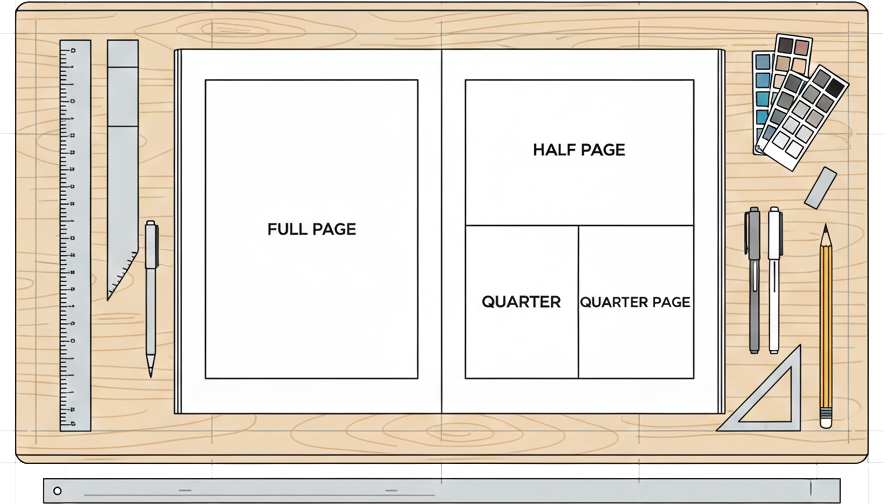
Word Count & Layout: We generally allocate space by Full, Half, or Quarter pages. A Quarter page fits about 300 words of plain text. A Full page fits roughly 950 words (allowing for columns and breaks that are NECESSARY to make it legible).
The "Image Rule": If you are including photos or logos, halve the text counts above to fit it in the same space. To keep the magazine legible, body text will never be shrunk below 10pt.
Send Your Layout: Whether you use Word, Publisher, or InDesign, we will re-typeset it - but please send your original layout! Seeing your design acts as a master guide, showing us exactly what you want to be emphasized and even your old clip-art is useful.
Web Link Etiquette: We won't print 30-digit URLs. If your link is a mess, we’ll simply say: eg:"Search for [Name] on Facebook."
Custom Handles: Don't leave your organisations Facebook Page as a random ID string. Create a printable handle (e.g., @GoxhillGrapevine) so it's actually readable.
How-to: Facebook Username Guide
Email Security: Emails are fine for print, but we strip them from the website to stop spam. Provide a phone or web link as a digital alternative.
The master image guide
Photos in Documents: Including photos in a Word or PDF file is helpful to show me where they belong in your story. However, these programs "crunch" images to save space. The Request: Always send the original "Master" image file separately for any large features or the Front Cover.
Avoid "Fixing" Images: Please don't try to edit or sharpen the photo yourself. Avoid "AI Enhancers" or sharpening apps, as these often add digital noise, which can make the photo unusable in print. Just send the raw, largest original file you have available, straight from your camera.
Resolution (DPI): Digital photos are grids of colored squares called pixels. Most 'screen' images are 72dpi, but for print, we need more "dots" per inch. The larger your original file scale, the more dots I have to work with, the more likely it makes it to print.
The "Golden Rule": Bigger is always better. To make your photos look professional - especially for the website or full-width color features - I need the version with the most data. If there are enough pixels in the original, I have everything I need to make it look great.
The Scale (Pixels): An image 600 pixels wide is like a tiny postage stamp; stretching it makes it look "blocky." An image 2000 to 4000+ pixels wide gives me a massive canvas to optimize for high-quality printing.
File Size Check: Not sure if your photo is high-quality? Check the file size on your device. Anything under 200KB is usually too small, while files between 2MB–10MB are perfect for covers.
*Anything under 200KB is far too small for print.
Don't send via WhatsApp or Messenger for big features; Use Email.
Platforms like Facebook and WhatsApp are the enemies of quality. Every time you "Share" a photo, the app "crunches" the file to save space. It's like making a photocopy of a photocopy.
Please do not send us screenshots. Your phone creates a low-quality "picture of a picture." It looks fine on a phone, but it's a blurry mess when printed.
Professional Assets
Why PDFs are Better: A JPEG is "flat," meaning the text and images are glued together. A high-quality PDF keeps layers separate, allowing for easy adjustments to fit the magazine’s layout.
The "Vector" Secret: Unlike photos made of tiny squares (pixels), Vectors are mathematical drawings. They are "unbreakable" - I can stretch a vector logo to the size of a house, and it stays perfectly sharp.
The Designer’s "Gold Dust": If you hear the terms EPS or AI, send those over! Even if you can’t open them on your computer, my software can, and they provide the highest possible quality.
The Big Request: If a professional or tech-savvy friend designed your flyer, always ask them for the original PDF file rather than a screenshot or a picture.
Avoid Phone Photos: If you have a physical flyer, please don't take a photo of it with your phone. Send us the digital file used for printing so the quality stays professional.
A Note on Quality: I can handle almost any file type, but I can only work with the data you give me. Starting with a "Golden" file ensures your content looks its absolute best in print.
Got an old print or a film negative you'd love to see in the magazine? Don't worry about trying to photograph it with your phone - glare and shadows are tricky to fix! The Gander now has access to professional scanning equipment. If you have something special, just get in touch and we can digitize it properly for you to ensure every detail is preserved.
Deadlines
Early is better: We are spending roughly two months planning the shape of the next issue before the submission deadline even hits. After that, editorial have very little time, with the rest being print and distribution where further entries are impossible.
Artwork: Late entries may not get in, and any entry looks better when we have more time to produce the artwork. It's rare, that a submitted image goes into the mag, without adjustments and that takes time.
The 4-Month Rule: The Gander seasonal edition covers 3 months, plus a month for editorial and distribution. You must confirm event dates up to 4 months ahead.
Seasonal Trap: Valentines and Pancake Day are almost always forgotten because people aren't thinking past Christmas when the Winter edition is released on December 1st, yet the issue covers all the way up to March 1st, when the Spring issue is published.
Rose, the editor of the Gander, also edits the Three Voices magazine every month. While articles sent to the Gander - especially church and chapel events—don't always make it to this publication, it remains a vital community link. Though its distribution is smaller at around 150 copies, it offers incredibly favorable advertising rates for those looking to reach a dedicated local audience and is printed monthly.
The Church and Chapel hold an annual Goxhill Calendar photography competition, an initiative separate from the Gander but supported by its talent. Because the necessary design skills often sit within our editorial team, our chair of trustees, Jeff Teasdale, continues to lead the production. As the final calendar features high-quality imagery, contributors should ensure all entries follow our master image guide for the best results.
advertisement